Showing posts with label Android. Show all posts
Showing posts with label Android. Show all posts
Tuesday, October 6, 2015
Snake for android
I've just finished another android app: Snake.
Here are the github repository and the .apk download links.
Screenshots:
Read more »
Here are the github repository and the .apk download links.
Screenshots:

Automated splascreens for mobile and tablet applications
When creating mobile or tablet applications, your assets take time to load. Wether you prefer native or hybrid development, you end up customizing splashcreens for each of the screen resolutions, layout modes (portrait or landscape). This work is a bit cumbersome and no responsive technics exist in this field.
I have come up with a nice solution that takes a single PNG file as input. This file must be designed with every constraints in mind. Therefore, I also provide a canevas that helps out its creation:

Once done, using Grunt and my plugin grunt-phonegapsplash, creating all your required splashscreens is a matter of a single command line.
Here is the basic workflow that it automatically handles for you :
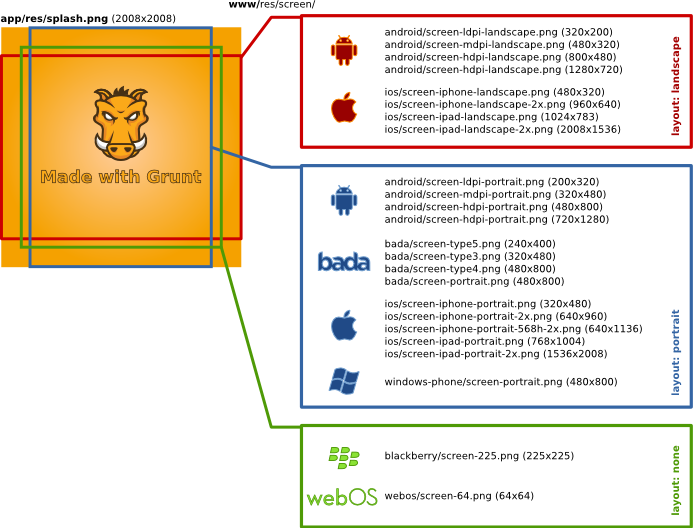
The canevas and the source file are available on Github. The plugin is easily installed via npm.
Read more »
I have come up with a nice solution that takes a single PNG file as input. This file must be designed with every constraints in mind. Therefore, I also provide a canevas that helps out its creation:
Once done, using Grunt and my plugin grunt-phonegapsplash, creating all your required splashscreens is a matter of a single command line.
Here is the basic workflow that it automatically handles for you :
The canevas and the source file are available on Github. The plugin is easily installed via npm.
Speed boost your Android emulator
By default, the Android Emulator is software based. Firing it up takes around ~1min and it consumes a lot of CPU power and battery life, which is a pain when you are using a laptop.
Along with your installation of your Android SDK Manager, there is an extra option which allows you to install HAXM, the Hardware Accelerated Execution Manager from Intel. You find it just here :

However, once downloaded, this tool is not installed automatically. You have to execute it. Open a terminal and hit the following command :
But wait, if you are on a OSX Mavericks or on Windows 8, don't start your Android emulator too quickly. The Android SDK provides an old release that would make your Mac or PC to hang (yerk). Fortunately, Intel provides a fix available in the Developer Zone.
OK, now, we are ready to speed up the Android Emulator.
Go back to your Android SDK Manager and in Tools > Manage AVDs , create a fresh Android Virtual Devices. In the creation pane, check the option Use Host GPU.
The speed boost is amazing: starting the Android Emulator takes now around ~30s. But it's not the only interesting side effect. Now, all your emulated apps go faster and it takes less, I mean really less, power on your host.
Just a couple of caveats though. Using the Android Emulator doesn't prevent you from testing your apps on real devices. As a matter of fact, the Intel Android Emulator uses your Intel processor (better being said than being sorry...). Therefore, your native code and by native I mean the real native code (the one being written in C or C++, not the Java code, which is called native but is more a Just in time interpretation of Java bytecode) may have quirks on MIPS processors that you just can't see on Intel's ones.
Read more »
Along with your installation of your Android SDK Manager, there is an extra option which allows you to install HAXM, the Hardware Accelerated Execution Manager from Intel. You find it just here :
However, once downloaded, this tool is not installed automatically. You have to execute it. Open a terminal and hit the following command :
open /usr/local/opt/android-sdk/extras/intel/Hardware_Accelerated_Execution_Manager/IntelHAXM.dmg
But wait, if you are on a OSX Mavericks or on Windows 8, don't start your Android emulator too quickly. The Android SDK provides an old release that would make your Mac or PC to hang (yerk). Fortunately, Intel provides a fix available in the Developer Zone.
OK, now, we are ready to speed up the Android Emulator.
Go back to your Android SDK Manager and in Tools > Manage AVDs , create a fresh Android Virtual Devices. In the creation pane, check the option Use Host GPU.
The speed boost is amazing: starting the Android Emulator takes now around ~30s. But it's not the only interesting side effect. Now, all your emulated apps go faster and it takes less, I mean really less, power on your host.
Just a couple of caveats though. Using the Android Emulator doesn't prevent you from testing your apps on real devices. As a matter of fact, the Intel Android Emulator uses your Intel processor (better being said than being sorry...). Therefore, your native code and by native I mean the real native code (the one being written in C or C++, not the Java code, which is called native but is more a Just in time interpretation of Java bytecode) may have quirks on MIPS processors that you just can't see on Intel's ones.
Monday, October 5, 2015
My first android app
I finally started learning android and spent the last few days working on my first app: an illustration of the Monty Hall problem.
Read more »
Here are the github repository and the .apk download links.
Screenshots:
Créer des icônes d'applications pour tablettes et mobiles à partir d'un SVG
A chaque fois que vous ciblez un nouvel OS pour applications mobiles et tablettes, il est nécessaire de produire plusieurs types d'icônes. Pour alléger ce travail fastidieux, j'ai publié un plugin pour Grunt.
Un petit graphique vaut mieux qu'un long discours :

Ce plugin s'appelle grunt-svg2storeicons. Son code source est disponible sur Github et disponible sous la forme d'un module npm.
Read more »
Un petit graphique vaut mieux qu'un long discours :
Ce plugin s'appelle grunt-svg2storeicons. Son code source est disponible sur Github et disponible sous la forme d'un module npm.
Subscribe to:
Posts (Atom)