Showing posts with label Innovation. Show all posts
Showing posts with label Innovation. Show all posts
Tuesday, October 6, 2015
Famo.us FlexGrid in CoffeeScript with Meteor
Did I just post something similar few hours ago? Indeed very similar. But this time, this goes on a very different scale. The same demonstration is now reactive with datasources coming from a MongoDB, your session or any reactive dictionary that Meteor can provide.
But wait... There's more. Actually, this is not a piece of code that you will paste into your Meteor project. It's a plugin. One command and one line of templating and it is set. One line of templating means: in just one single line of code.
This is all made possible thanks to the efforts of Gadi Cohen's excellent package's Famous-Views and his community (in which I contribute a bit).

Basically, here is how it works. Famo.us components are registered in the Meteor's templating engine. It can be regular components or home made ones. Using your favorite templating language, being Spacebar or Jade, you create the layout of your app. You connect your reactive datasource in your templating if they are already available or via small template helpers à la Meteor. It's like Famo.us/Angular with a full stack JS framework. And if you are using Jade, it is like drawing the Famo.us rendering tree with your code and connect it with reactive data source.
As an example, here is the code required for creating the example displayed in the video:
As an example, here is the code required for creating the example displayed in the video:
// This is pretty basic for every mobile app.
head
  title FlexGrid test
  meta(charset='utf-8')
  meta(name='viewport', content='width=device-width, maximum-scale=1, user-scalable=no')
  meta(name='apple-mobile-web-app-capable', content='yes')
  meta(name='apple-mobile-web-app-status-bar-style', content='black')
  meta(name='apple-mobile-web-app-capable', content='yes')
  meta(name='mobile-web-app-capable', content='yes')
body
  // Every Famo.us apps starts with a context.
  +famousContext id="mainCtx"
    // The code is divided into reusable templates
    // looking very much like web components.
    +flexGridExample

template(name='flexGridExample')
  // Now we create our 'render tree'.
  +Scrollview id='scrollview'
    // Here is the FlexGrid: it's indeed a single line of code!
    +FlexGrid id='flexgrid'
      // Here, I connect my datasource: a reactive array.
      +famousEach items
        // I use the available values in each item of the array
        // Note that CSS styles can be passed as reactive value,
        +Surface class='surf' properties=color
          // Or as reactive content.
          p= name
Simple. The community has also brought some others nice plugins that speeds up the creation of your app. The number of plugins available is growing fast.

3D hardware accelerated SVG using famo.us and Meteor
One of the main problem with SVG for Android or Chrome, desktop and mobile, is the lack of hardware acceleration. Multiple issues also prevents some nice effects like skewing for instance. Making smooth animated SVG in a browser or in Cordova tends to be tricky.
As stated in one of my former blog post, famo.us makes a good candidate for removing this pain and Meteor, with its famous-views package, makes a good candidate for tying up everything together.
This weekend, I've started working on a famous-views's plugin named fview-svg. Basically, it reads your SVG as template and create famo.us's
Here is a little video that demonstrates my first demo with fview-svg:
As you can check it in the source code, without the comments, this demo is less than 20 lines of codes. And there is room for improvements.
I've deployed a live demo and you can play with it: fview-svg.
I've tested on desktop in Safari, Chrome, Firefox and Opera. On iOS8, I've tested it, an iPad Mini, an iPad 2, an iPhone 5S. On Android, I've tested it on release 4.4.2 on a Samsung Galaxy Tab and on release 4.0.3 on an HTC Desire C. And this is this last test that just surprised me. You may not even know what this terminal is. It's a low end smarphone. Very cheap. A single core under 1GHz. What Android call a
The source codes of the plugin as well as a tutorial for recreating this demo are available on Github: fview-svg.
Note: The plugin is not already available on Atmosphere, the official Meteor repository. I wand to test it against several additional demos to check which API would be good to export for easing the integration. Still, you can start cloning it and import it in your project if you want to contribute or cannot wait few days.
Read more »
As stated in one of my former blog post, famo.us makes a good candidate for removing this pain and Meteor, with its famous-views package, makes a good candidate for tying up everything together.
This weekend, I've started working on a famous-views's plugin named fview-svg. Basically, it reads your SVG as template and create famo.us's
Surface and StateModifier out of it. One of the sensitive parts of the process was the inverted coordinate system of SVG compare to DOM and SVG's responsive nature. But the beauty of making it a plugin with famous-views is that it will be available for anyone. Nice.Here is a little video that demonstrates my first demo with fview-svg:
As you can check it in the source code, without the comments, this demo is less than 20 lines of codes. And there is room for improvements.
I've deployed a live demo and you can play with it: fview-svg.
I've tested on desktop in Safari, Chrome, Firefox and Opera. On iOS8, I've tested it, an iPad Mini, an iPad 2, an iPhone 5S. On Android, I've tested it on release 4.4.2 on a Samsung Galaxy Tab and on release 4.0.3 on an HTC Desire C. And this is this last test that just surprised me. You may not even know what this terminal is. It's a low end smarphone. Very cheap. A single core under 1GHz. What Android call a
midpi. These terminals still equip a large portion of Android's market share. Just to give you a glimpse on these terminals, it doesn't even run the first Angry birds properly... And here, the SVG animation was perfect. Fluid. I almost shed a tear.The source codes of the plugin as well as a tutorial for recreating this demo are available on Github: fview-svg.
Note: The plugin is not already available on Atmosphere, the official Meteor repository. I wand to test it against several additional demos to check which API would be good to export for easing the integration. Still, you can start cloning it and import it in your project if you want to contribute or cannot wait few days.
getWifi: OpenID for your WiFi access
This project is so nice that I have to share it. Watch their funny video and vote for them at TheSummit.
The future of WiFi connectivity is in our hands.
Read more »
The future of WiFi connectivity is in our hands.
Do we need HTML and CSS when we got JavaScript or more? A case for AbsurdJS, Meteor, Famo.us and CoffeeScript.
Introduction
AbsurdJS is an amazing project. What is it about? A processor for your HTML and CSS in JavaScript. In JSON to be more precise.The problem
CSS was invented for designers. But do you really know that much designers that are able to provide you with a nice CSS rules that will be awesome on all screens? You are favored by gods if it is your case. Most of the time, they will provide you with some PSD (what an ugly form of design), AI (if you are lucky), Sketch or SVG (here, it is not anymore based on luck, it is like having an angel upon your shoulders).The same goes with HTML. Semantics that appears with HTML5 were added for SEO. But do you know that much SEO guys that will give you the right HTML code? I haven't seen any in my whole 20 years on the web carrier(though SEO is not that long of a job).
Thus, why are we using 3 languages for writing our codes. Is that right? Do we have to? Is it done for helping us and keeping separation of concerns? Funny. Patterns like this exists since the dawn of design patterns from the GoF. And what if we need to synchronize this HTML, CSS and JS back together for animations purposes? We request back in our code the HTML tags that we have just declared? We hooks on the CSS? If we need a color theme, do we have to write it twice or more? Funny, too. Even media queries for responsive web designs, seems like an odd way of reproducing the abstract factory pattern (or the bridge depending on if you know to who you are distributing your files).
The solutions
There are many. Generally, I was keen on using preprocessors: SASS, LESS, Stylus, YAML, Jade, Blade, CoffeeScript, Typescript, Dart, ... But, it finally does not give me a proper answer to the problems previously mentioned. It still need glue code to make all of this work together properly. Things started to shape up when I end up using Meteor, Famo.us and Velocity.js. The Blaze component of Meteor is transforming your HTML, more precisely, your HTML templates using Spacebar, a derivative of Mustache, into JS code. The same goes with Famo.us. It creates HTML and CSS rules that plays well together so that they limit layout trashing issues and combines this technics with advanced physic and animation engine. The same goes with Velocity.js. This jQuery plugins brings back synchronized CSS animations in with JS.Still, plain vanilla JavaScript is a pain to write. While there are plenty of transpilers that could lessen the burden (like Dart and Typescript, to mention the most used ones), none have proven to be as easy as CoffeeScript to me.
Conclusion
Now the solution starts to shape up. Why not use the power of AbsurdJS, Meteor, Famo.us and CoffeeScript? This combination would be a real full stack. It would goes from the persistance layer, the application server to the front end with one and only one language. A transpiled one that even lessen the number of lines that you need to write.Charts for easy choosing your Famo.us easing functions
Famo.us provides 30 different easing functions for tweening animations. Choosing the most appropriate one will give you the best results possible before creating your own if none matches your expectations.
With these charts, choosing is going to be far more easier:
Read more »
With these charts, choosing is going to be far more easier:
Responsive SVG devices for famo.us and Meteor
Introduction
When creating a landing page or when demonstrating an app, there are often some smartphone, tablet or desktop screenshots. This pattern of demonstration could be a bit enhanced if instead of simple screenshots, the real app could be demonstrated. That would be the power of HTML5 sets in motion.The base component
Famo.us has a nice component that could be leverage for that: the ContainerSurface. It is basically a small context that can be clipped. By living in the same space of your main web site, it allows interesting demonstration patterns where you could demonstrate your app. The problem is to display this context exactly on the device that you want to present.By using an adaptive or a responsive SVG, you can extract coordinates of the device screen where you want to present your app. You can then instantiates a ContainerSurface on this same coordinates and put you app as its content.
In this little plugin fview-devices for famous-views, a Meteor package, this is exactly what is done. Here is a little demonstration of it:
You can also play with it in this live demo: fview-devices.
Conclusion
Beyond this little example, some interesting points emerge such as the capability to mix SVG and Famo.us. It paves the way to further enhancements. For instance, CSS Transform and Animation are possible in SVG. Unfortunately, they are not hardware accelerated. Worst, some browsers have very uneasy bugs to circumvent. By extracting portions of SVG and putting them into Famo.us surfaces, you regain hardware acceleration and circumvent issues from wrong implementations. Basically, you open up wider the capability to use SVG to the mobile platforms.It seems to me that a new story of apps using SVG, Famo.us and Meteor is about to begin. Happy coding.
A reactive favico for Meteor: rxFavico
I've packaged the nice favico.js project for Meteor: rxFavico. The added bonus is that it's now reactive. You simply modify a reactive dictionary, your favico changes automatically and all your associated display as well. This is handy for coupling it with a mailbox widget or the results of tests while developing.
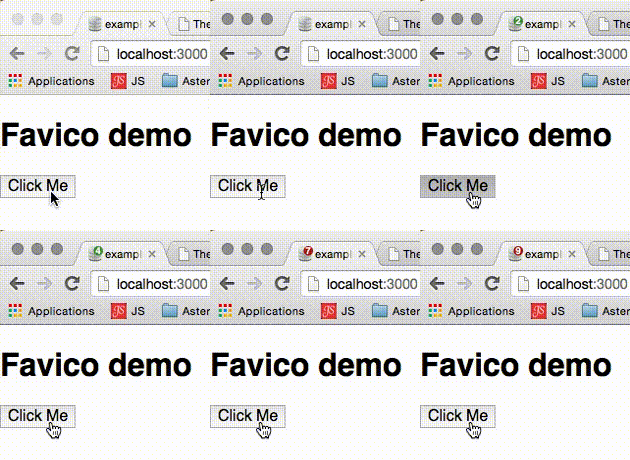 Here is how to install it:
Read more »
meteor add pierreeric:rxfavicoHere is an example in CoffeeScript for using it:
rxFavico.set 'count', 10The source are available on Github.
Le chien + zen
 |
| Les masques tomberont le 22 février. |
Ou likez-le sur Facebook.
Atom is getting ready for Meteor 1.0.0
Thanks to Ben Strahan, Atom.io is getting ready for the upcoming Meteor-1.0.0 with the Meteor-Helper package.

There are also few others fixes and enhancements that you can see on the release notes: https://github.com/PEM--/meteor-helper/releases
Read more »
There are also few others fixes and enhancements that you can see on the release notes: https://github.com/PEM--/meteor-helper/releases
Create your CSS styles in CoffeeScript for Meteor
I've created my first Meteor package today: CSSC. This package eases the creation of CSS stylesheets in CoffeeScript.
For using it, adds the package into your Meteor's project:
I've also created 2 plugins for this package:
Read more »
For using it, adds the package into your Meteor's project:
meteor add pierreeric:csscOnce done, just create your stylesheets using DOM and CSSOM notation. For instance, I will create 2 classes
selected and unselected: if Meteor.isClientAs you can see it, the syntax is close to what you would use in Stylus or SASS (when using
Meteor.startup ->
css = new CSSC
css.add '.selected',
margin: CSSC.x 3
border: "3px solid #{CSSC.yellow}"
borderRadius: CSSC.x 5
css.add '.unselected',
color: CSSC.yellow
.sass notation).I've also created 2 plugins for this package:
- CSSC-Colors which allows inclusion of a nicer set of colors
- CSSC-Famous which avoids you from including CSS files from Famo.us.

With Meteor, this package and its plugins, you don't have to send CSS files to your client. Everything is packed within a single JS file.
Famo.us dot loader animation using Meteor's Famous-Views
A simple customizable dot loader ported for famous-views:
Source code: fview-dotloader
Demo site: fview-dotloader
Original work: LeXXik and Talves.
Read more »
Source code: fview-dotloader
Demo site: fview-dotloader
Original work: LeXXik and Talves.
Setup a Famo.us experiment using Codepen.io
I've created a CodePen for easing creation of experiments with Famo.us. It uses Jade and CoffeeScript as its defaults and imports Famo.us and jQuery in their minified version. Fork it and play with it. Happy coding!
Read more »
Some Famo.us demo with Meteor
Lately with famous-views, a package for Meteor, we have added some plugins for easing developments. To better demonstrate how to use them and what they bring, I've added some live demo for each one that I've created.
Here is a fast access to these demo:
Read more »
Here is a fast access to these demo:
- fview-bksurfaceimage: Adaptive images.
- fview-devices: Responsive SVG devices working as container for demoing apps.
- fview-dotloader: Simple and customizable loader.
- fview-slidedeck: Slide deck engine à la Bespoke, Reveal, Impress, Prezzi.
- fview-flexgrid: Flexible grid.
Put your HTML, CSS and JS in a single file using Meteor
It could be a bit cumbersome to switch from your HTML template file to your JS logic to your CSS stylesheets. I consider that the method exposed hereafter isn't tailored for novice users. Still, it can help you understanding how Meteor works.
Actually, the method is quite simple. It all drills down to how the HTML files are generated using Blaze, the reactive UI. During the build process of your app, Meteor builds JS file out of your HTML template file and exposes / sends them to your clients. This method short-circuits the build process. If you write directly your HTML using Blaze, the reactive UI, you remove the HTML file. The second step is to use JS to write your CSS. Here, I use the CSSC package for Meteor.
Here is the results for an equivalent of the default Meteor app.
 You could think of it as a small component into a larger app.
And now, here is the code to create this small component. As promised, a single file, in CoffeeScript for brevity:
If you want to test it yourself, here is the set of required commands:
At the beginning, it may look a bit weird. But this could be useful from time to time. Note that you can put some nice additions to this sample. For instance, instead of using the events helpers which will scan you DOM for the button, you could directly affect the click event logic when you are creating the button element. If you are looking for performances on some parts of your app, this could be an interesting technic.
Read more »
Actually, the method is quite simple. It all drills down to how the HTML files are generated using Blaze, the reactive UI. During the build process of your app, Meteor builds JS file out of your HTML template file and exposes / sends them to your clients. This method short-circuits the build process. If you write directly your HTML using Blaze, the reactive UI, you remove the HTML file. The second step is to use JS to write your CSS. Here, I use the CSSC package for Meteor.
Here is the results for an equivalent of the default Meteor app.
And now, here is the code to create this small component. As promised, a single file, in CoffeeScript for brevity:
# Render the body when Meteor is ready
Meteor.startup Template.body.renderToDocument

# HTML
# ----
# Instantiate a main template
Template['main'] = new Template 'Template.main', ->
  # Return a table of DOM elements
  [
    # A 'p' tag with a reactive variable
    HTML.P 'Count ', Blaze.View => Spacebars.mustache @lookup 'count'
    # A 'button' tag
    HTML.BUTTON '+1'
  ]

# JS logic
# --------
# Declare a reactive variable
Session.set 'count', 0
# Expose the reactive variable to the template
Template.main.helpers 'count': -> Session.get 'count'
# Handle template events
Template.main.events
  'click button': (e,t) ->
    e.preventDefault()
    Session.set 'count', 1 + Session.get 'count'
# Add the template to the document's body
Template.body.addContent ->
  Spacebars.include @lookupTemplate 'main'

# CSS
# ---
# Instantiate a stylesheet
css = new CSSC
# Style the body and the text
css.add 'body',
  margin: CSSC.px 20
  backgroundColor: CSSC.navy
  color: CSSC.aqua
# Style the button
.add 'button',
  width: CSSC.px 50
  border: "#{CSSC.px 1} #{CSSC.maroon} solid"
  borderRadius: CSSC.px 3
  backgroundColor: CSSC.red
  color: CSSC.yellow
If you want to test it yourself, here is the set of required commands:
# Start by creating a simple app.
meteor create singlefile
cd singlefile
# Remove the Meteor's default app.
rm *
# We are going to focus only on the front.
# Our single file is being placed in the client directory.
mkdir client
# Add the necessary packages.
meteor add coffeescript pierreeric:cssc pierreeric:cssc-colors pierreeric:cssc-normalize
# Create your single file and start editing it.
touch client/main.coffee
At the beginning, it may look a bit weird. But this could be useful from time to time. Note that you can put some nice additions to this sample. For instance, instead of using the events helpers which will scan you DOM for the button, you could directly affect the click event logic when you are creating the button element. If you are looking for performances on some parts of your app, this could be an interesting technic.
Create your slide deck using Famo.us and Meteor
Introduction
Yesterday, there was the Paris Famo.us Meetup organized by AdFab and Meetic France. I was presenting the first part, which consists of a live coding or demo showcasing. I intended to demonstrate some basic techniques on Famo.us's physic engine. Live coding is tough. There are always some "demo effect" and time runs out very quickly.Fortunately, for this demo preparation, I created some slides. As the meetup was about Famo.us, I decided to code my slide deck using... Famo.us and Meteor.
The slides are deployed on Meteor: MeetupFamousSlides.

The core components
If you think about a presentation tool, it only consists of static pages that you present one after the other. This is definitely the job of iron:router.Creating each slide is easily done when you are using a templating system with emphasis on semantic. Jade and Markdown fit very well in this equation. Therefore, I ended up choosing mquandalle:jade. Each slide is a single Jade file. Thanks to the power of Meteor, you can write additional logic in the template for animating the slide's content.
Speaking of animations, modern slide deck use some of them. Famo.us is really a nice framework for this task. But coupling Meteor and Famo.us is a bit tedious. This is where enters gadiccohen:famous-views. It bridges both worlds with an incredible ease of use. I strongly recommend you to have an eye on it.
Conclusion and code reuse
In less than 2 hours, the presentation engine was ready and I had a basic presentation. Adding slides was a no brainer simply consisting in updating the router and adding a Jade file.You can find the code of the engine and the slide deck on this Github repository.
Flare demo in Famo.us
A very simple Famo.us demo inspired from the 3d demo of Julian Shapiro.
Read more »
Project Tango: The future of augmented reality?
That sounds like a revolution in augmented reality.
Read more »
getWifi: Invited at the Beta
Yesterday, I was invited at the beta testing of getwifi.io. It works like a charm and simplify greatly the way you distribute your WiFi access to your friends and co-workers. I like it a lot.

You should check it out and vote for them at theSummit.
They really deserve some love!
Read more »
You should check it out and vote for them at theSummit.
They really deserve some love!
Tutoriel NodeJS : NodeWebkit
Comme d'habitude, Grafikart nous apporte un tutoriel très bien fait. En moins de 30 minutes, il réalise une application compatible Windows, Mac et Linux.
Tout d'abord, parlons un peu de Node-Webkit. Node-Webkit est un peu l'Apache Cordova pour ordinateurs.
Grosso modo, on prend son application HTML5 et on l'intègre dans le conteneur natif. Plus précisément, le conteneur natif exécute un navigateur un peu déshabillé (WebKit dans ce cas). Si le dialogue avec le natif se fait via le
Ce framework étant disponible depuis 2012, il est sacrément stable et utilisable en production. Adobe, Twitter, Github, Intel l'utilisent pour certaines de leurs applications. Pour l'avoir utilisé, je vous le recommande sérieusement.
Read more »
Tout d'abord, parlons un peu de Node-Webkit. Node-Webkit est un peu l'Apache Cordova pour ordinateurs.
Grosso modo, on prend son application HTML5 et on l'intègre dans le conteneur natif. Plus précisément, le conteneur natif exécute un navigateur un peu déshabillé (WebKit dans ce cas). Si le dialogue avec le natif se fait via le
bridge.js pour Apache Cordova, Node-Webkit privilégie une interaction via NodeJS. De fait, il offre la possibilité d'accéder à la multitude de bibliothèque que cette VM fournit. C'est d'une efficacité absolument incroyable.Ce framework étant disponible depuis 2012, il est sacrément stable et utilisable en production. Adobe, Twitter, Github, Intel l'utilisent pour certaines de leurs applications. Pour l'avoir utilisé, je vous le recommande sérieusement.
Subscribe to:
Posts (Atom)